No Dockerfile
Package the JAR and launch metadata into an application-only OCI image without a Dockerfile.
Push your app (a fat JAR, a layered classpath, or a JPMS module) to an OCI registry. Brewlet runs it with a JDK installed on the node. No Dockerfile. No OS or JVM layers in your application image.
Brewlet brings SpinKube's node-resident runtime model to Java.
Public pre-1.0 preview. Use a disposable evaluation environment.
runtime layers are versioned with the image;
unchanged layers can be cached
the node supplies the shared JDK;
each workload keeps its own JVM and heap
Bruno Borges introduces Brewlet and explores a WebAssembly-inspired way to run Java workloads on Kubernetes.
FROM eclipse-temurin:21-jre   # you own this base + its CVEs
COPY target/app.jar /app/app.jar
ENTRYPOINT ["java","-jar","/app/app.jar"]

$ docker build -t registry/app:1.4.2 .
$ docker push registry/app:1.4.2 # unchanged layers are reused# Package a local OCI image: the Go CLI does not upload to a registry
$ brewlet push target/app.jar demo/app:1.4.2 --store ./oci --format image
# With the Maven Central plugin declared in pom.xml:
$ mvn package brewlet:push brewlet:manifest \
-Dbrewlet.registry=registry.example.com/team
# → javaapplication.yaml already references the published image digest
# Review ports, probes, and runtime settings before applying.
# Deploy separately with kubectl or GitOps.
$ kubectl apply -f target/brewlet/javaapplication.yamlApplication images omit the OS and JDK. Payload size depends on your app and dependencies; ordinary container tooling also reuses unchanged layers. Declare the Maven plugin in your POM before using the brewlet: commands.
The artifact includes a JSON descriptor that tells Brewlet how to start your
application. brewlet push creates the minimum config for you, or
you can provide your own with --config.
{
  "schemaVersion": 1,
  "mainJar": "app.jar",
  "entry": { "mode": "jar" },
  "enablePreview": false,
  "addOpens": ["java.base/java.lang=ALL-UNNAMED"],
  "systemProperties": { "file.encoding": "UTF-8" }
}
Keep application-specific settings here: preview features, module access, and
system properties. Choose the JDK, ports, launcher, and resource settings such
as -XX flags in the deployment descriptor. If no node provides the
requested JDK, admission fails with NoCompatibleJDK.
Brewlet separates application packaging from node runtime maintenance. Platform teams own the JDK and its userland; application teams own their code and dependencies.
Package the JAR and launch metadata into an application-only OCI image without a Dockerfile.
Ship application-only images. Platform teams scan and patch the JDK and its OS userland separately; runtime CVEs still require remediation.
Update node JDKs without rebuilding application images. Roll workloads to move running JVMs onto the new runtime.
arch constraint.
Three components connect Brewlet to Kubernetes: a provisioner installs JDKs on
each node, a containerd shim runs the application, and a RuntimeClass
routes pods to that shim.
Use your normal mvn package or gradle bootJar build. No Brewlet-specific build step is required.
The Maven plugin publishes the application-only image to your registry. brewlet push writes a local OCI layout for inspection and local runs.
Kubernetes sends a pod with runtimeClassName: brewlet to a node prepared by the provisioner.
The shim mounts the node's JDK read-only, applies the pod's cgroup limits, and starts the app with java -jar inside a runc sandbox.
Pods use CNI, kubectl logs/exec, probes, and Services.
CPU HPA configuration is available;
see requirements and validation limits.
Your CI pushes an artifact to the registry while the Kubernetes control plane schedules the pod. On the worker, containerd's CRI pulls the runnable image; the shim verifies content-store blobs and assembles the JVM sandbox.
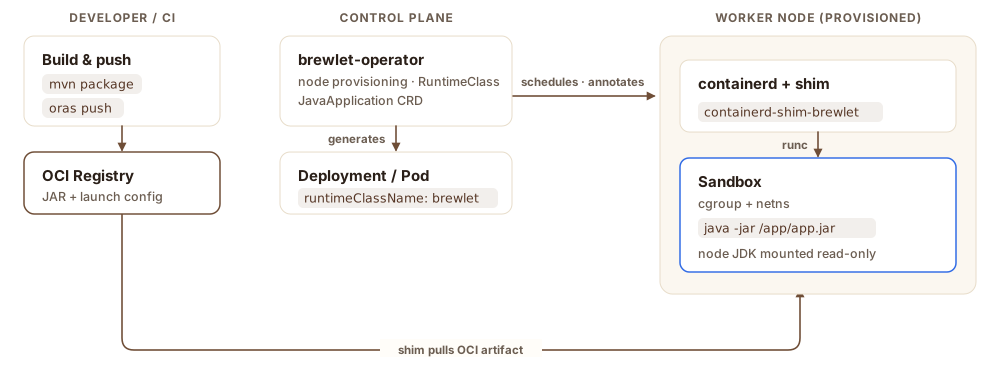
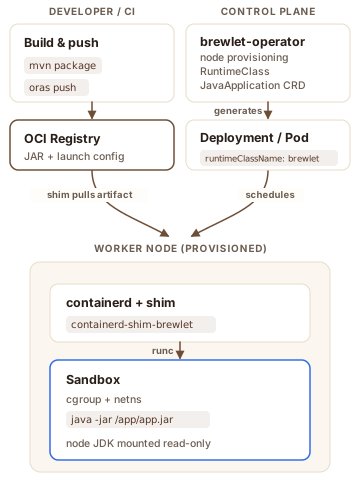
The control plane never touches your JAR — it only schedules the pod and provisions the node. Containerd CRI pulls the image; the shim uses its verified content and the node's shared JDK installation to assemble the sandbox. Adapted from the high-level architecture in the spec.
Generate development YAML with mvn package brewlet:push brewlet:manifest
after configuring the plugin.
The generated file already contains your image digest; the descriptor below
illustrates the structure rather than a file you need to copy.
The illustrative output shows local and Kubernetes execution; actual resource
readings depend on the JDK and deployment settings.
apiVersion: apps.brewlet.sh/v1alpha1
kind: JavaApplication
metadata:
  name: orders
spec:
  artifact:
    # Illustrative digest; brewlet:manifest fills in the actual build digest.
    image: registry.example.com/team/app@sha256:<published-digest>
  replicas: 1
  jvm:
    version: 21                    # must match a JDK your nodes offer
    args: ["-XX:MaxRAMPercentage=50.0"]
  resources:
    limits: { cpu: "1", memory: "256Mi" }   # become cgroup limits
  ports: [{ containerPort: 8080 }]
  service: { enabled: true }
The operator turns this into the Deployment and Service below. The controller
adds runtimeClassName, and the node-resident JDK runs the JAR under
the declared cgroup limits.
# Run an artifact already packaged in the local OCI store
$ brewlet run demo/hello:1.0.0 --store ./oci
→ java -jar /run/brewlet/app.jar   (no container image)

$ curl localhost:8080/hello
Hello from a JAR running directly
on the node via Brewlet!# For this example, configure appName=orders and the settings shown above.
$ kubectl apply -f target/brewlet/javaapplication.yaml
$ kubectl get pod -l app=orders
NAME READY STATUS
orders-7c9… 1/1 Running
# Curl the Service: pod limits cpu "1", memory 256Mi
$ curl orders:8080/info
availableProcessors: 1 # the CPU limit, not the node
maxMemory: 128 MB # heap bounded under 256Mi
The JVM sees 1 CPU and a heap bounded under 256Mi because the
containerd shim wires the pod's cgroup limits into the process.
See source-built CPU scaling validation and its limits.
With Brewlet's default
runnable-image format, image: <ref> is all the pod needs; kubelet
pulls it like any container image.
| Brewlet (JVM) | Traditional container | |
|---|---|---|
| Workload | existing JVM applications | any containerized process |
| Developer artifact | JAR, classpath, or JPMS app in OCI | full OCI image |
| Dockerfile required | no | no (for example, Jib or Buildpacks) |
| Runtime location | shared node JDK | inside the image |
| Patch the runtime | update node JDKs, then roll workloads | update images and roll workloads |
| Isolation | namespaces + cgroups (runc) | namespaces + cgroups (runc) |
| K8s integration | Services, probes, logs; CPU HPA candidate validated | full |
| Best fit | JVM compatibility without full images | general-purpose workloads |
Install the released CLI on macOS or Linux, then run a Java application. You need JDK 21+, Maven 3.10+, Git, curl, and tar. No Go toolchain, Docker, or Kubernetes cluster is needed.
# Install the CLI (the installer verifies the release checksum)
$ curl -fsSL https://brewlet.sh/install.sh | sh
$ export PATH="$HOME/.local/bin:$PATH"

# Build the example from the matching release tag
$ git clone --depth 1 --branch "v$(brewlet version)" https://github.com/microsoft/brewlet.git
$ cd brewlet
$ mvn -q -f integration-tests/fixtures/demo-app/pom.xml package

# Package, inspect, and run from a local OCI store
$ brewlet push integration-tests/fixtures/demo-app/target/app.jar \
    demo/hello:local --store ./oci --format artifact
$ brewlet inspect demo/hello:local --store ./oci
$ brewlet run demo/hello:local --store ./oci
Stop the app with Ctrl+C, then package a local image with the plugin from Maven Central. First declare the plugin in integration-tests/fixtures/demo-app/pom.xml, using the version reported by brewlet version. Maven downloads it automatically, with no manual installation or GitHub credentials. When ready for Kubernetes, use mvn package brewlet:push brewlet:manifest with your registry to publish and generate development YAML. Review it and apply separately with kubectl; the developer workshop walks through this without hand-written YAML.
# With the Maven Central plugin declared in this POM, build a local OCI layout
$ mvn -f integration-tests/fixtures/demo-app/pom.xml package brewlet:build \
-Dbrewlet.image=demo/hello:localNo. The OCI artifact contains the application and a small launch config, but no OS or JVM layer. The node supplies the JDK and its supporting userland at run time. Those runtime components still need scanning and patching; an application-only image does not eliminate OS vulnerabilities.
Brewlet uses the standard JVM launch mode declared by the artifact: java -jar, a classpath main class, or a JPMS module. It does not replace the JVM. Run a Spring Boot app with the local Kubernetes guide, or see supported Boot layouts for packaging options.
Limits become cgroup constraints via runc. The container-aware JVM interprets those limits together with the application's and deployment's JVM arguments. Memory limits cover the whole process, not just the heap.
Optional AppCDS can reduce startup work when an archive matches the JDK build, architecture, and application. Authorized node-side regeneration writes an archive on JVM exit for later launches; it is not an instant first-start cache. Each workload retains its own JVM and heap, so shared JDK storage does not imply automatic memory savings. See the AppCDS docs.
Yes. The provisioner installs a JDK matching each node's architecture, and portable JARs schedule anywhere. A JAR with native (JNI) bits can declare an arch constraint so admission steers it onto matching amd64/arm64 nodes; if no node of that architecture exists yet, the pod waits Pending for one. See the multi-arch docs.
Whatever your nodes offer. Run brewlet k8s jdk list to list the JDK distributions and versions available across the cluster before you pick one in the deployment descriptor. Asking for a JDK no node provides fails fast with a NoCompatibleJDK admission error.
Brewlet uses runc isolation and privileged node provisioning; it is not an additional hostile-tenant isolation boundary. Trust the platform operators and follow the security guide. gVisor and Kata integrations are not supported; stronger isolation is roadmap work.
Component releases carry verifiable build provenance. Managed-dependency admission verifies Brewlet's DSSE attestations; see source-built live validation and its limits. General cosign or standard SLSA admission for application images is not implemented; see the supported admission contract and limitations.
Yes. Brewlet is additive: it only handles pods that opt in via runtimeClassName: brewlet. Everything else runs normally.
Push a JAR, schedule a pod, serve real traffic under cgroup limits. Explore it, run it, contribute.