No Dockerfile
Push the JAR itself as an OCI artifact instead of building a container image.
Push your app (a fat JAR, a layered classpath, or a JPMS module) to an OCI registry. Brewlet runs it with a JDK installed on the node. No Dockerfile. No OS base image. No JVM bundled with every app.
Brewlet brings SpinKube's node-resident runtime model to Java.
you build, patch & push all of it
the JDK installation lives on the node,
shared & patched centrally
FROM eclipse-temurin:21-jre   # you own this base + its CVEs
COPY target/app.jar /app/app.jar
ENTRYPOINT ["java","-jar","/app/app.jar"]

$ docker build -t registry/app:1.4.2 .
$ docker push registry/app:1.4.2 # ~250 MB# Push ONLY the JAR as an OCI artifact
$ brewlet push target/app.jar registry/app:1.4.2
# …or with the installed v0.1.0 Maven plugin, no CLI:
$ mvn package sh.brewlet:brewlet-maven-plugin:0.1.0:push \
-Dbrewlet.image=registry/app:1.4.2
# Deploy it — one Brewlet-specific line:
runtimeClassName: brewlet
image: registry/app:1.4.2
resources:
limits: { cpu: "2", memory: "512Mi" }You ship the 5 MB you wrote. Brewlet supplies the rest from the node.
The artifact includes a JSON descriptor that tells Brewlet how to start your
application. brewlet push creates the minimum config for you, or
you can provide your own with --config.
{
  "schemaVersion": 1,
  "mainJar": "app.jar",             // the JAR inside the artifact
  "entry": { "mode": "jar" },       // java -jar (or "classpath")
  "enablePreview": false,          // app-intrinsic launch knobs only
  "addOpens": ["java.base/java.lang=ALL-UNNAMED"],
  "systemProperties": { "file.encoding": "UTF-8" }
}
Keep application-specific settings here: preview features, module access, and
system properties. Choose the JDK, ports, launcher, and resource settings such
as -XX flags in the deployment descriptor. If no node provides the
requested JDK, admission fails with NoCompatibleJDK.
Brewlet removes image construction, OS base-layer patching, and JDK distribution from each application release.
Push the JAR itself as an OCI artifact instead of building a container image.
The artifact contains no OS layer for application teams to scan, patch, or rebuild.
JDKs live on the node. Upgrade them centrally without rebuilding every application.
arch constraint.
Three components connect Brewlet to Kubernetes: a provisioner installs JDKs on
each node, a containerd shim runs the application, and a RuntimeClass
routes pods to that shim.
Use your normal mvn package or gradle bootJar build. No Brewlet-specific build step is required.
brewlet push (or the released Maven plugin) uploads the JAR plus a tiny launch config as an OCI artifact. No Dockerfile.
Kubernetes sends a pod with runtimeClassName: brewlet to a node prepared by the provisioner.
The shim mounts the node's JDK read-only, applies the pod's cgroup limits, and starts the app with java -jar inside a runc sandbox.
Real pod IP via CNI, kubectl logs/exec, probes, HPA and Services all work unchanged.
Your CI pushes an artifact to the registry while the Kubernetes control plane schedules the pod. The shim on the selected worker node pulls the artifact directly from the registry and runs it.
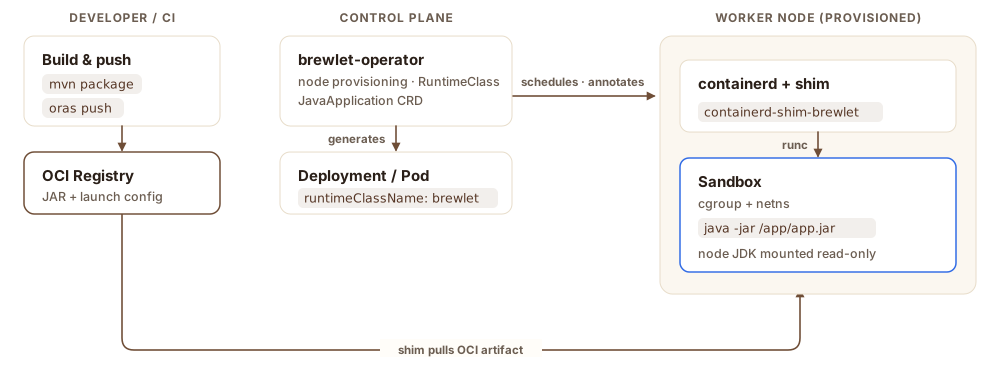
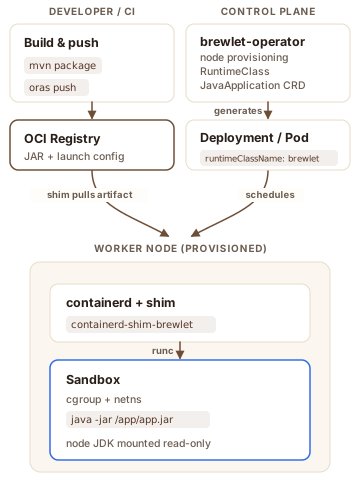
The control plane never touches your JAR — it only schedules the pod and provisions the node. The shim on that node pulls the artifact directly from your registry and assembles the sandbox from the node's shared JDK installation. Adapted from the high-level architecture in the spec.
The descriptor below is the complete Kubernetes configuration a developer writes. The captured output shows the same application running from an OCI artifact on a laptop and as a Deployment and Service whose JVM honors the pod's CPU and memory limits.
apiVersion: apps.brewlet.sh/v1alpha1
kind: JavaApplication
metadata:
  name: orders
spec:
  artifact:
    image: registry/app:1.4.2        # the OCI artifact — just the JAR
  replicas: 1
  jvm:
    version: 21                    # must match a JDK your nodes offer
    args: ["-XX:MaxRAMPercentage=50.0"]
  resources:
    limits: { cpu: "1", memory: "256Mi" }   # become cgroup limits
  ports: [{ containerPort: 8080 }]
  service: { enabled: true }
The operator turns this into the Deployment and Service below. The controller
adds runtimeClassName, and the node-resident JDK runs the JAR under
the declared cgroup limits.
# Pull the artifact and run the JAR directly
$ brewlet run demo/hello:1.0.0
→ java -jar /run/brewlet/app.jar   (no container image)

$ curl localhost:8080/hello
Hello from a JAR running directly
on the node via Brewlet!$ kubectl apply -f orders.yaml
$ kubectl get pod -l app=orders
NAME READY STATUS
orders-7c9… 1/1 Running
# Curl the Service: pod limits cpu "1", memory 256Mi
$ curl orders:8080/info
availableProcessors: 1 # the CPU limit, not the node
maxMemory: 128 MB # heap bounded under 256Mi
The JVM sees 1 CPU and a heap bounded under 256Mi because the
containerd shim wires the pod's cgroup limits into the process. Scaling, rolling
updates, probes, and Services all behave like any pod. With Brewlet's default
runnable-image format, image: <ref> is all the pod needs; kubelet
pulls it like any container image.
| Traditional container | Brewlet (JVM) | SpinKube (Wasm) | |
|---|---|---|---|
| Workload | any containerized process | existing JVM applications | Spin-compatible Wasm applications |
| Developer artifact | full OCI image | JAR, classpath, or JPMS app in OCI | Wasm/Spin application in OCI |
| Dockerfile required | yes | no | no |
| Runtime location | inside the image | shared node JDK | node-installed Wasm runtime |
| Patch the runtime | rebuild every image | upgrade the node JDK once | upgrade node runtime once |
| Isolation | namespaces + cgroups (runc) | namespaces + cgroups (runc) | Wasm sandbox |
| K8s integration | full | full (Services, probes, HPA, logs) | full |
| Best fit | general-purpose workloads | JVM compatibility without full images | small, fast-starting Wasm workloads |
Brewlet favors JVM compatibility; SpinKube favors the smaller footprint and capability model of WebAssembly.
Runtime, Kubernetes, Maven, specifications, and integration tests share one revision and coordinated CI. The website remains separately published.
CLI, OCI artifacts, containerd shim, and node provisioner.
Operator, admission webhooks, APIs, manifests, and Helm chart.
Build and publish Brewlet applications from Maven.
Architecture contracts and enhancement proposals.
Cross-component test orchestration and fixture applications.
This website, user guides, workshop, and brand assets.
Run Brewlet v0.1.0 on your machine with JDK 21+, Maven, and the released CLI. You do not need Go, Docker, Kubernetes, or a Brewlet source build.
# Detect your platform, download the latest release, and verify its checksum
$ curl -fsSL https://brewlet.sh/install.sh | sh
$ export PATH="$HOME/.local/bin:$PATH"
$ brewlet version

# Package only your JAR, then inspect and run it
$ brewlet push target/app.jar demo/app:0.1.0 --format artifact
$ brewlet inspect demo/app:0.1.0
$ brewlet run demo/app:0.1.0
Already have a Maven app? Install the released v0.1.0 plugin, then publish without a Dockerfile:
# Download and install the public release into your local Maven repository
$ curl -fLO https://github.com/brewlet/brewlet/releases/download/v0.1.0/brewlet-maven-plugin-0.1.0.jar
$ curl -fLO https://github.com/brewlet/brewlet/releases/download/v0.1.0/brewlet-maven-plugin-0.1.0.pom
$ mvn org.apache.maven.plugins:maven-install-plugin:3.1.4:install-file \
    -Dfile=brewlet-maven-plugin-0.1.0.jar -DpomFile=brewlet-maven-plugin-0.1.0.pom

# Build the JAR and push its runnable OCI image
$ mvn package sh.brewlet:brewlet-maven-plugin:0.1.0:push \
-Dbrewlet.image=registry/app:1.4.2No. The OCI artifact contains the application and a small launch config, but no OS or JVM layer. The node supplies the JDK at run time.
No. Brewlet starts it with the standard java -jar app.jar command. Spring Boot, Quarkus, JMX, OTel, JFR, and shutdown hooks work normally. Layered Spring Boot builds and JPMS modules are supported too; see the Spring PetClinic walkthrough.
Exactly like any pod: limits become cgroup constraints via runc, and the container-aware JVM sizes its heap and thread pools accordingly. Brewlet injects no JVM flags of its own.
The JDK installation already lives on the node and is shared across pods; each pod still runs in its own JVM process, so nothing pulls a JVM per pod, and only the small JAR moves over the network. AppCDS is built in: a class-data archive ships as an artifact layer (brewlet:appcds) and the JVM memory-maps it on launch, or the node can regenerate one on first run via spec.jvm.cds.regenerate. See the AppCDS docs.
Yes. The provisioner installs a JDK matching each node's architecture, and portable JARs schedule anywhere. A JAR with native (JNI) bits can declare an arch constraint so admission steers it onto matching amd64/arm64 nodes (or denies it with NoCompatibleArch). See the multi-arch docs.
Whatever your nodes offer. Run brewlet jdks to list the JDK distributions and versions available across the cluster before you pick one in the deployment descriptor. Asking for a JDK no node provides fails fast with a NoCompatibleJDK admission error.
Isolation is runc-equivalent to ordinary containers (non-root by default, seccomp/AppArmor, namespaces). Artifacts can require cosign/SLSA verification. Use gVisor/Kata for hostile multi-tenancy.
Yes. Brewlet is additive: it only handles pods that opt in via runtimeClassName: brewlet. Everything else runs normally.
Push a JAR, schedule a pod, serve real traffic under cgroup limits. Explore it, run it, contribute.